
-
In case of a charger trip, kindly reach out to our customer support hotline at +65 6881 8383 to report the issue.
Our team will address and resolve the matter. Meanwhile, please proceed to the nearest EV charger.
-
The observed charging speed may be slower than the displayed kWh due to various factors. Factors such as power fluctuations, temperature, or the electric vehicle's battery management system can influence the charging rate. Additionally, charging speed may vary during different stages of the charging process. It's worth noting that these variations are common, and the displayed kWh is an estimate.
-
There may be a few reasons why this happens. One possible reason is that there is a communication error between the charger and your vehicle. If you are able to unplug the charger from your vehicle, it is safe to drive off. Another reason could be that the charger is not able to update the system that charging has stopped. Please be assured that once the vehicle stops charging, there would not be any charges to your credit/debit card. Please try the following steps:
- Force quite the app and relaunch. This will make the app check with the system on the charging status again.
- If this does not work and you urgently need to charge your vehicle, please call our customer support hotline at +65 6881 8383 or email us at [email protected].
-
If you are unable to initiate a charge, simply:
- Unplug the charger gun
- Force close the mobile application
- Clear the app cache
- Plug in the charger gun
- Reopen the application
- Re-initiate the charging through the application.
If the issue still persists, you may go ahead to the nearest location for EV Charging.
-
The first thing to unlock your electric car. This trick usually works since the number one reason EV cables get stuck is because the vehicle itself needs to be unlocked before the cable can be physically released.
-
Some chargers may have been marked as private. Check that you are logged in with your registered account.
If you belong to a fleet, please contact your fleet administrator.
-
EV drivers should prioritise safety by observing the following precautions:
- Adverse Weather: Avoid using charging stations located in unsheltered areas during rain, lightning, or any other adverse weather conditions.
- Damaged Stations: Do not use charging stations that appear damaged, are immersed in water, or are involved in a fire.
By following these guidelines, you can ensure a safer charging experience for yourself and others.
-
Typically, there are multiple charging guns at one location. Please proceed to the next available charger at your location. Alternatively, you may find the next nearest available location. For assistance, please call our support hotline at +65 6881 8383 or email [email protected].
-
One possible reason is that the charging system of your EV is not designed to charge at the rate stated on the charger. That being said, you can still charge your EV at the charging station.
-
Every EV has a built-in system to prevent it from overcharging.
However, you are encouraged to stop charging and leave the lot so as to allow other EV users the opportunity to use the charger. -
The charger cannot be unplugged when it is still charging.
This is because the charging gun will be locked in position. -
Please try locking and unlocking your EV a few times before you unplug.
Often, it is the EV that is latched on to the charging gun rather than the other way around. -
You may enable your location and use our CDG ENERGY Mobile App to find the next nearest available EV charger.
-
During an Alternate Current (AC) charging session not all energy goes into the vehicle’s battery. This is commonly known as “transmission loss”. An additional 12% to 15% of energy is used to convert energy from the charger to the vehicle’s battery, depending on the onboarding system of your car in the car. Regardless of the transmission loss, you can be assured that the your EV charger battery is charged optimally.
-
Typically, takes less than a minute for the charger to start charging. We recommend that you wait for the App to reflect that the charging session has commenced before leaving the vehicle to charge. Alternatively, you may also check your vehicle's dashboard to see if the charging session has commenced.
If you continue to face this issue even after some time, please call our customer support hotline at +65 6881 8383.
-
There may be a few reasons why this happens. One possible reason for this is that there is a communication error between the charger and your vehicle. If you are able to unplug the charger from your vehicle, it is safe to drive off. Another reason could be that the charger is not able to update the system that charging has stopped. Please be assured that once the vehicle stops charging, there would not be any charges to your credit/debit card. Please try the following steps:
- Force quit the app and relaunch. This will make the app check with the system on the charging status again.
- If this does not work and you urgently need to charge your vehicle, please call our customer support hotline at +65 6881 8383 or email us at [email protected].
-
You may need to unplug the charger from your EV and restart the charging process. Alternatively, you may try a different charger. If you suspect the charger is faulty, please call our customer support hotline at +65 6881 8383 to report issue or email us at [email protected]
-
Emergency shut-off buttons found near our EV Chargers are meant to address emergency situations only and should not be misused. The E-stop button should only be activated under these circumstances:
- Fire hazard/ flash flood during charging
- In the event there is sudden lightning and thunderstorm while the vehicle is still charging at an unsheltered station, and the user is unable to unplug the charging arm despite several attempts to unplug it.
- When your vehicle has stopped charging but the App shows that the charging session is still ongoing;
- When you are unable to unplug the charging arm after charging has completed. Do reach out to our customer support hotline at +65 6881 8383 or email us at [email protected]
-
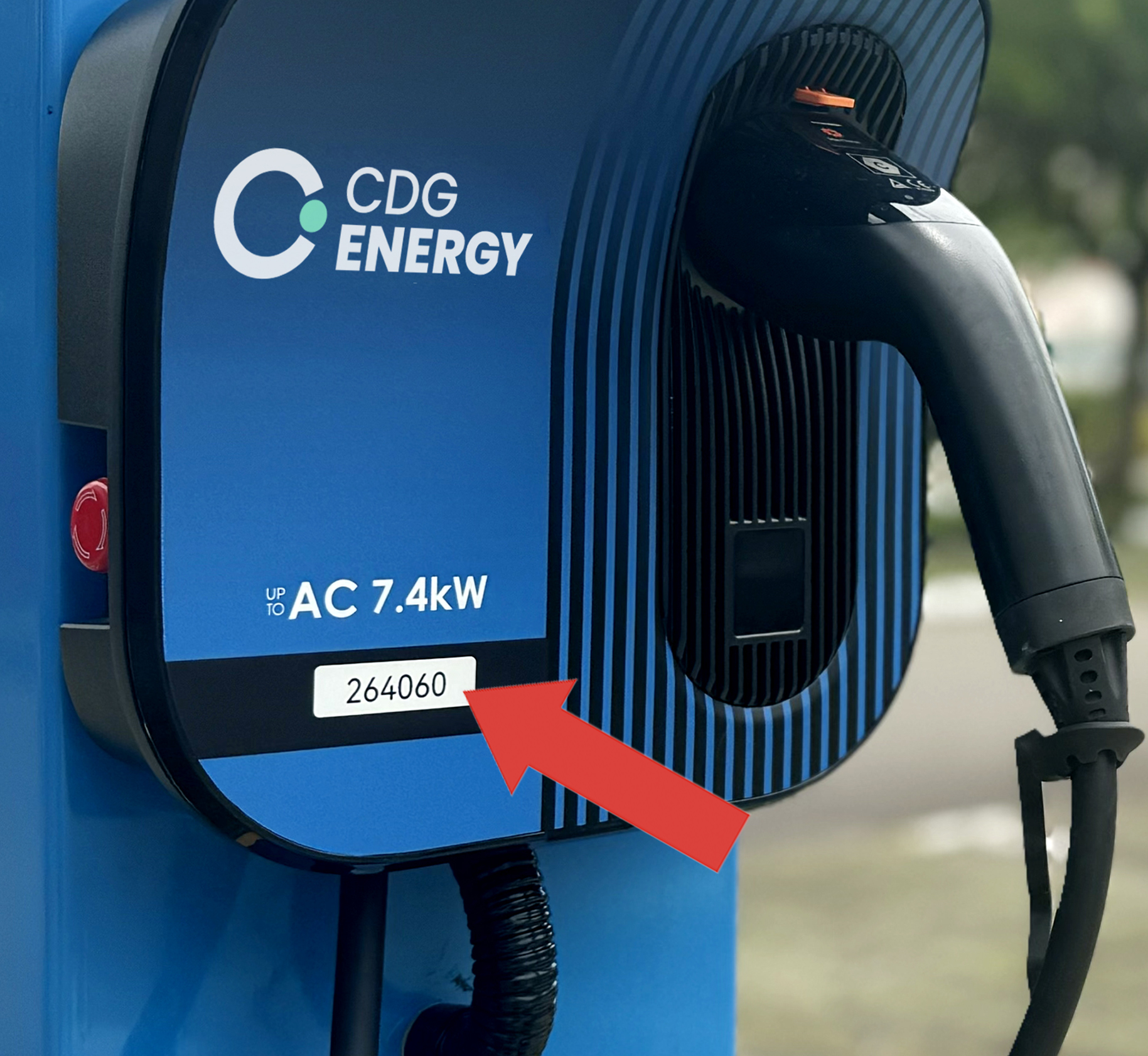
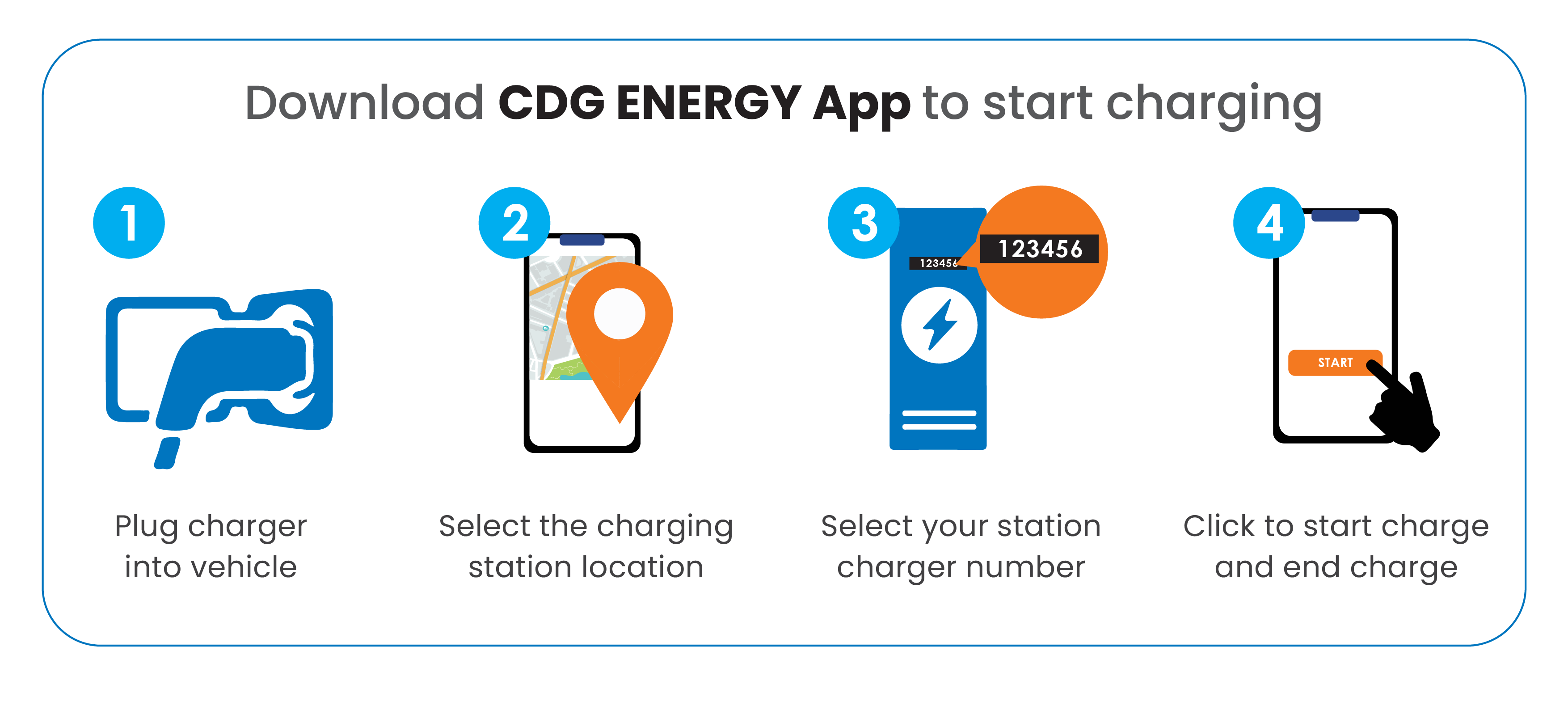
For every charger, there is a unique five- to six-digit station ID. This station ID is displayed on the physical charger as well as on the CDG ENERGY EV Charging App. To start charging, please launch the App and click on the station ID that corresponds to the ID on the physical charger.
-
Download our CDG ENERGY App. After you have download the App, please refer to the User Guide below:
FAQ
Charging Matters
Overnight Charging & Idling Fee
-
Drivers are encouraged to download or update the charging app to ensure they receive session notifications. Before starting any charging session — particularly overnight sessions — the app will display applicable policies and prompt drivers to confirm their understanding. Enable push notifications on app to receive real-time alerts. Review the session policy before confirming an overnight charge. Unplug promptly once charging is complete to avoid idling fees and free the bay for fellow drivers.
-
Yes. A grace period is provided after your vehicle reaches full charge. The idling fee will only begin after this window has passed. Please refer to the app for the specific grace period at your location.
-
Charging that continues after 3:00 AM will revert to standard per-kWh rates. Idling fee policies also apply if your vehicle is fully charged and remains connected beyond the grace period.
-
An idling fee is a charge applied when a fully charged electric vehicle (EV) remains connected to a charger beyond the permitted grace period. It encourages drivers to unplug promptly after charging is complete, keeping chargers available for other users.
-
Overnight charging refers to charging sessions that take place during designated overnight hours (10:00 PM to 3:00 AM). A minimum spend policy applies during this period to ensure the service remains sustainable and accessible.
-
Idling fees apply after the grace period once charging has been completed, and the vehicle remains plugged in. Rates and conditions may vary by site and charger type. Please refer to the app for the applicable rates at each charging location.
-
EV charging points are a shared resource. When a vehicle occupies a charger after it is fully charged, it prevents other drivers from accessing it. The idling fee helps manage charger availability fairly and efficiently across all users.
-
The overnight period supports drivers who need longer charging windows — such as those with larger battery capacities. The minimum spend ensures the charger is used productively during this time. For overnight charging sessions between 10:00 PM and 3:00 AM, a minimum spend of SGD 15.00 — or your actual usage, whichever is higher — will apply.
Payments
-
Price adjustments are necessary for us to keep up with our services for our customers with the higher operating and materials costs such as security upgrades and feature enhancements together with the 24/7 support that are vital for our growing number of users on our platforms. We aim to continue to invest and innovate for a continuous improvement in the service and support you can expect from us.
-
The Merchant Category Code (MCC) for EV Charging is 5552.
-
-
When you initiate a charging session, a pre-authorization hold is placed on your payment card. This is a temporary hold on a portion of your card's available balance to verify that the card is valid and has sufficient funds for the transaction.
The pre-authorization amount is not the actual transaction amount. Once your charging session ends, the final transaction amount will be charged to your card, and the pre-authorization hold will typically be released within 5 to 7 days.
Please note that the exact timing for the release of the pre-authorization amount depends on your financial institution or bank.
-
UOB EVOL Card: Enjoy 10% cashback on Online spend with a min. spend of S$800 per statement month on your card. Cashback is capped at S$30 per statement month for Online and Mobile Contactless Spend. Exclusions and other terms and conditions apply. Visit here for details.
UOB One Credit Card: Enjoy up to 3.33% cashback based on a retail spend of S$2,000, S$1,000 or S$600 and min. 10 transactions per statement month for each qualifying quarter to earn the quarterly cashback of S$200, S$100 or S$60 respectively. Exclusions and other terms and conditions apply. Visit here for details.
-
You may check your charging history via the CDG ENERGY App.
-
Your bank statement will show the transaction under the description “CDG ENERGY”.
-
Your charging fees are calculated based on the number of kilowatt-hours (kWh) delivered by the charger. The app maintains a convenient pay-per-charge model, so you are billed after each session without the need for any prepaid value.
All prices are inclusive of GST.
-
Currently, our app accepts the following payment methods:
- Visa
- Mastercard
We are working to enhance our payment options in future.
-
You may make payment using the credit card or debit card that is registered with your CDG ENERGY App account.
-
Yes, prevailing charges by carpark operators will be incurred when charging your EV.
Mobile App
-
We require updates to the latest Android or iOS platform and our app versions to ensure you have the most secure, stable, and optimized experience. Older versions may be slower, less secure, or incompatible with new system requirements.
Mandatory updates help maintain system security and service continuity, while enabling us to deliver the best performance. We continuously enhance features, integrate user feedback, and ensure compatibility with rapid changes in mobile operating systems.
-
Delivering good value, superior service and network reliability to our customers remain at the forefront of our business. Some of the enhancements include feedback received from customers, whilst protecting data integrity and addressing any potential security issues that could affect our customers are top priorities.
Do look out for app updates and ensure you also regularly update your firmware of your iOS or Android platform to ensure continued service reliability and compatibility.
-
The CDG ENERGY Charging App is available on Google Play Store and Apple Store.
Account & Registration
-
You will not be charged for having a registered account. You will only be charged for your EV charging transactions.
-
Please tap on the “Forgot Password” link in the App to reset your password.
-
Simply download the CDG ENERGY App from your app store and tap “Register Now” to create your account.
-
Your password needs to be at least eight characters in length, inclusive of at least one uppercase letter, one lowercase letter and one number.
-
To register for an account, you will need a valid mobile number and a VISA or Mastercard credit/debit card.
-
You can still use our EV chargers without registering and pay using either your credit or debit card.
-
While registration is not needed to start charging, registration is highly recommended for better user experience.
EV Charging Roaming
-
Very much like Telco roaming, cross-border charging allows EV drivers to charge on a partner network without the need to download another app and create another account. As we grow our networks, our customers will have the option to charge at more charge points beyond CDG ENERGY network with the CDG ENERGY app.
-
From the CDG ENERGY app, you will be able to see the nearest charge point based on your location. You will then be able to match the image on your app with the corresponding charge point when you are at the location.
Example: -
All roaming transactions will be charged to the payment card that you registered on the CDG ENERGY app. These will be like the transactions made locally.
-
Roaming charges are priced based on agreed prices and currencies with our partner.
The prices on our partners' networks are priced in reference to their own network.
-
Roaming charges are priced based on agreed prices and currencies with our roaming partners. However, you will be charged based on your home currency. You will also be billed in the same manner as your home application.
For example, if you are a CDG ENERGY customer and you charge at one of our partners in Malaysia, you will be charged in Malaysian Ringgit (MYR) the amount stated on the app.
Subsequently, you will be billed in Singapore dollars (SGD) based on prevailing exchange rates.
-
If you are facing issues with your mobile app or account, please contact CDG ENERGY at +65 6881 8383.
If you are facing issues specific to the charger you are at, please contact our Malaysian partner with the details below.
 Hotline: +6011 2337 3387 (Call & WhatsApp)
Email: [email protected]
Website: chargev-ygt.com
Hotline: +6011 2337 3387 (Call & WhatsApp)
Email: [email protected]
Website: chargev-ygt.com -
Yes you will need to log in to your CDG ENERGY account in order to charge in Malaysia.
-
As of now, all roaming chargers have their own charging cables. You do not need to bring your own cables.